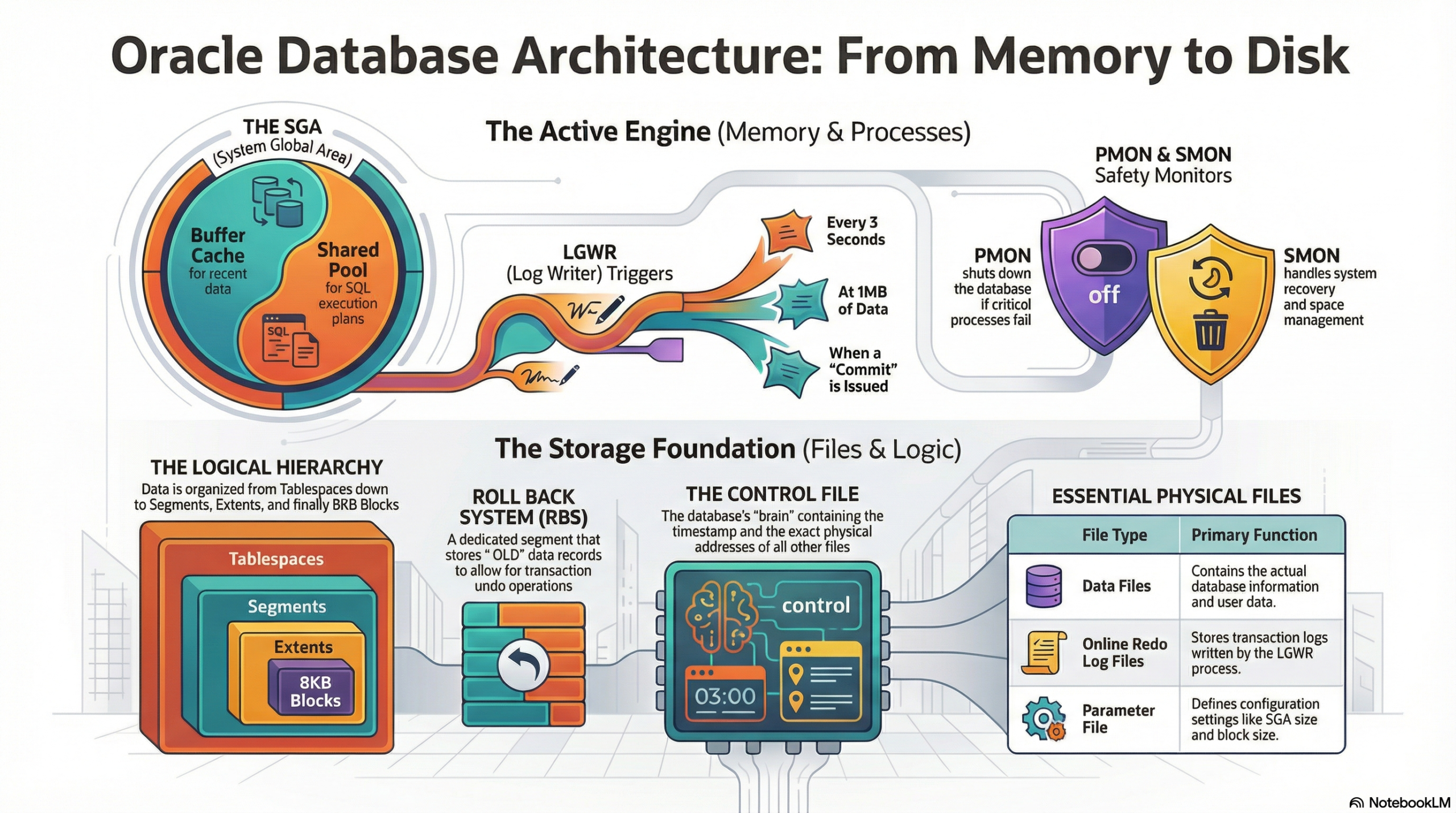
Ever wondered what happens behind the scenes when you hit “Execute” on a SQL query? It’s not just magic; it’s a sophisticated symphony of memory structures, specialized background processes, and a meticulously organized physical storage hierarchy. This intricate system is what allows Oracle to handle petabytes of data, ensure high concurrency, and guarantee rock-solid data integrity.
If you’re a developer or a DBA, understanding this architecture is the difference between writing “okay” code and engineering high-performance, scalable systems. It is the core knowledge that informs tuning decisions, capacity planning, and robust disaster recovery strategies. Let’s pull back the curtain on the Oracle Database Blueprint.
1. The Memory Mansion: Where the Magic Happens (SGA & PGA)
When the Oracle instance starts up, it claims a significant chunk of your server’s RAM, primarily through two dynamic and critical areas: the System Global Area (SGA) and the Program Global Area (PGA).The System Global Area (SGA): The Shared Workspace
The SGA is a shared memory area accessible by all background processes and all connected user processes. It is the nucleus of the Oracle instance, acting as a high-speed cache for data and control information, significantly reducing disk I/O. Its size is often the single most important factor in database performance.
Components of the SGA:
- Shared Pool: This is the “brain” of the SGA. It stores execution plans, parsed SQL, and data dictionary information. It is crucial for performance by facilitating Soft Parses. Its size directly impacts how often queries must be re-parsed.
- Database Buffer Cache (DB Cache): This is the “workbench” where copies of data blocks retrieved from disk are held. It is the largest and most dynamic part of the SGA and the heart of performance. All read and write operations first occur here. When a user updates a record, the :NEW image of the data block is held here, marked as “dirty.” The cache uses algorithms like Least Recently Used (LRU) to manage block replacement.
- Redo Log Buffer: This is the “short-term memory” for every change made (DML/DDL), which are recorded as Redo Entries. It ensures recoverability by buffering changes before they are written to the physical Online Redo Log Files by the LGWR process, guaranteeing transactional integrity.
- Large Pool: An optional area used for I/O server processes, backup and recovery operations, and the storage of session information for shared server architecture. It prevents large, infrequent memory allocations from fragmenting the Shared Pool.
- Java Pool: Used for all session-specific Java code and data within the database, supporting Java Stored Procedures and Java Virtual Machine (JVM) usage.
The Program Global Area (PGA): The Private Workspace
The PGA is private memory allocated to each server process when a user connects to the Oracle database. It is not shared.

Components and Role of the PGA:
- PGA (Program Global Area): Contains data and control information for a single user process. It handles the memory required for complex SQL operations that cannot be performed in-memory, such as sorting (e.g., ORDER BY or GROUP BY), hash joins, and bitmap merge operations. If a PGA task exceeds the allocated memory, Oracle spills the data to temporary segments on disk (a “disk sort” or “spill”), which severely impacts performance.
- UGA (User Global Area): Used primarily in a shared server configuration to store session-specific information, such as cursor state and variables. It isolates session state from the shared server process, allowing the process to switch between different user sessions.
2. The Invisible Workforce: Background Processes
The true heavy lifting of the Oracle engine is performed by a specialized crew of mandatory and optional background processes. They manage memory, perform I/O, enforce integrity, and handle recovery.
- LGWR (Log Writer): The speedster. It manages the high-speed transfer of redo entries from the Redo Log Buffer to the physical Online Redo Log Files. It is triggered by a COMMIT, when the Redo Log Buffer is 1/3rd full, when 1MB of redo has accumulated, or when a DBWR needs to write dirty blocks. It is crucial for ensuring all committed transactions are recoverable.
- DBWR (Database Writer): The heavy lifter. It writes dirty blocks (modified data blocks in the DB Cache) to the permanent Data Files on disk. This is an I/O intensive process. It is triggered by a Checkpoint (CKPT) signal or when the DB Cache is too full and needs space for new blocks.
- CKPT (Checkpoint): The coordinator. It updates the headers of all Data Files and the Control File to record the System Change Number (SCN) of the last successful checkpoint. Its function is to signal the DBWR to write all dirty blocks up to a certain SCN, which minimizes the time needed for instance recovery.
- SMON (System Monitor): The guardian. It performs instance recovery at startup if the previous shutdown was irregular (crash). It also cleans up temporary segments and coalesces free extents. Its recovery role is to apply remaining redo from the Online Redo Logs after a crash.
- PMON (Process Monitor): The supervisor. It cleans up after a failed user process (a session crash). Its function is to roll back the transaction the failed process was running (using the Rollback/Undo Segments), release locks, and free up resources in the SGA.
- ARCH (Archiver): The backup specialist. If in ARCHIVELOG mode, it copies filled Online Redo Log Files to a designated Archive Log Directory. This function enables point-in-time recovery and is essential for any production environment.
- MMON/MMNL (Manageability Monitor/Lightweight): Support processes for the Automatic Workload Repository (AWR) and Automatic Diagnostic Repository (ADR). Their function is to collect key performance metrics and statistics, storing them in AWR snapshots for later analysis and tuning.
3. From Logic to Lead: Storage Hierarchy
Oracle organizes data with a precision that bridges the logical view seen by users and the physical reality on disk.Physical Files (The Foundation)
- Parameter File (PFILE/SPFILE): Stores configuration details, such as SGA size and control file locations. The SPFILE (Server Parameter File) is the preferred, dynamic version.
- Control File: The smallest but most critical file. It contains the structural metadata of the entire database, including the database name, location of all Data Files and Online Redo Log Files, and the current checkpoint SCN. Multiplexing (having multiple copies) is mandatory.
- Data Files: Contain the actual user and dictionary data. These are the physical representation of the logical Tablespaces.
- Online Redo Log Files: The files LGWR writes to, recording a running history of all changes. Used for instance recovery.
- Archived Redo Log Files: Copies of the filled Online Redo Log Files, used for media recovery (restoring data from a backup).
The Logical Layer (The User View)
- Tablespace: The logical container for all database segments, mapped to one or more physical Data Files.
- Segment: A logical object that consumes storage, such as a table, an index, or an undo segment.
- Extent: A contiguous collection of data blocks that are allocated to a segment.
The Smallest Unit (The Block)
- Data Block: The smallest I/O unit that Oracle reads or writes, typically 8KB. Each block has a Header (around 1KB) for metadata and row directory entries, and the remaining space is used for the actual Row Data.
The Safety Net (Undo/Rollback)

- Undo Segment (formerly Rollback Segment): Stores the :OLD data records (the original image of the data) before a change was committed.
- Function: This historical data is essential for three major operations: Rollback (undoing a transaction), Read Consistency (allowing other users to see pre-change data), and Flashback Query (querying data as it existed at a specific point in the past).
Why Does This Matter?
Understanding this architecture is the foundation for optimization and troubleshooting.
- Performance Tuning: Knowing how the Shared Pool parses your SQL allows you to optimize by binding variables, minimizing hard parses, and ensuring index plans are cached.
- Commit Overhead: Knowing the LGWR flushes the Redo Log Buffer on every COMMIT highlights why excessive, single-row commits can destroy performance—it forces a physical disk I/O. Batching commits dramatically improves throughput.
- Buffer Management: Monitoring the Database Buffer Cache hit ratio informs you if you need to increase the cache size or tune problematic queries that cause excessive disk I/O.
- High Availability: Understanding the role of the Control File and Online Redo Logs dictates the multiplexing and archiving strategies necessary for robust disaster recovery.
Are you optimizing for Soft Parses in your current project?
Do you understand the real-world performance cost of a Hard Parse? Let’s discuss in the comments! 👇
#OracleDatabase #SQLDeveloper #DatabaseArchitecture #TechCommunity #PLSQL #DataEngineering
