In the world of relational database management systems (RDBMS), data is rarely stored in a single, massive table. Instead, it is normalized into multiple tables to reduce redundancy and improve data integrity. Consequently, the ability to combine these tables effectively is the hallmark of a skilled database developer.
In Oracle SQL, Joins are the primary mechanism used to link rows from two or more tables based on related columns. Mastering joins is not just about getting the right results; it’s about writing efficient queries that perform well under heavy workloads.
The Core Philosophy: Two Golden Rules of Joins
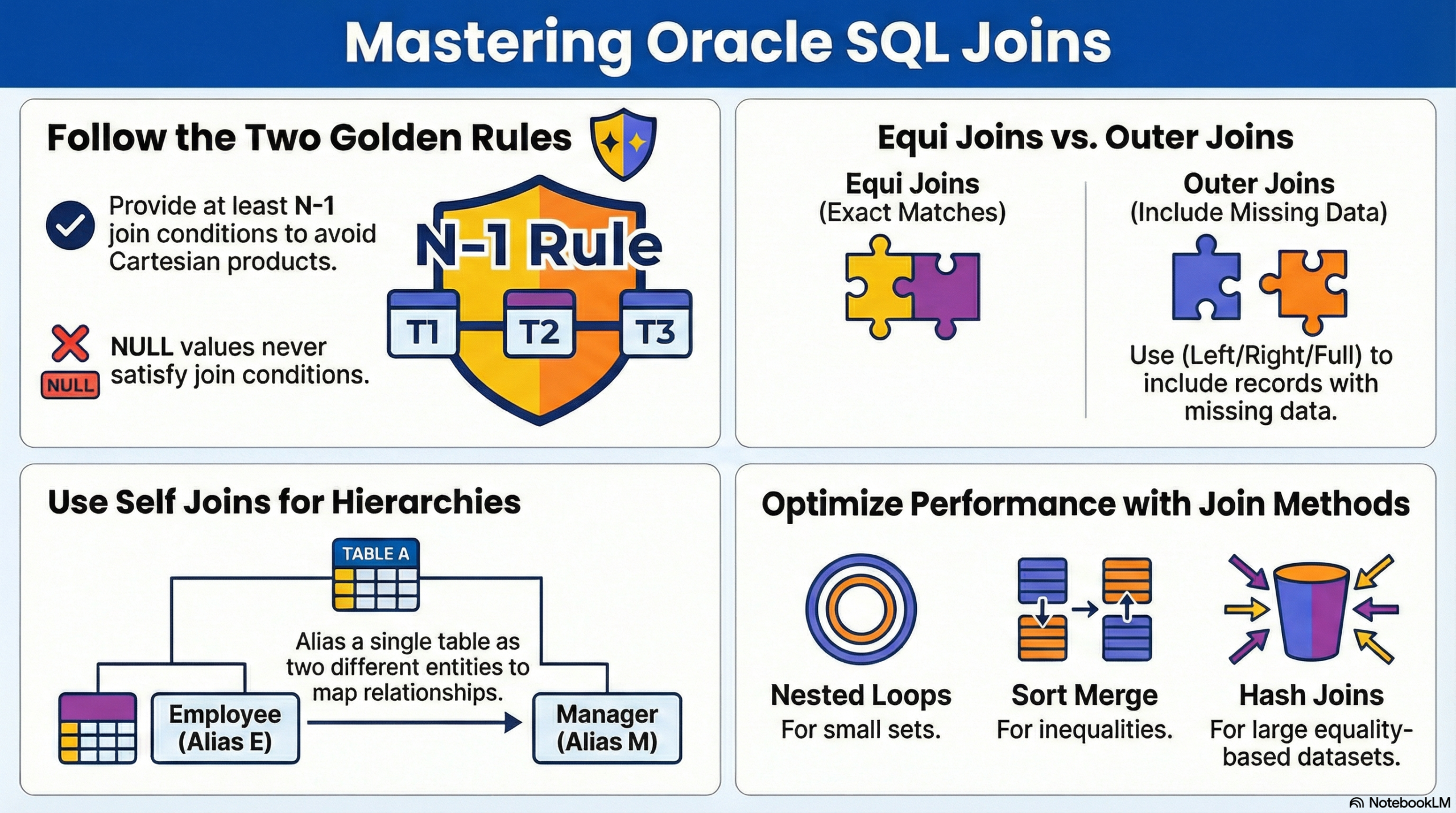
Before we write a single line of code, every Oracle developer must internalize these two fundamental principles:
- Nulls Never Join: In SQL logic,
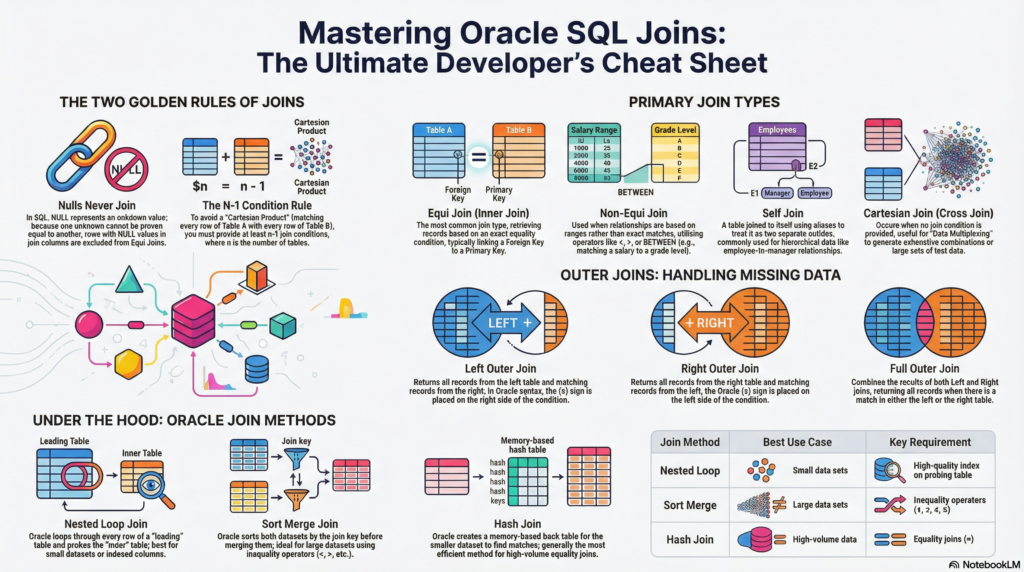
NULLrepresents an unknown value. Because you cannot say one unknown value is equal to another,NULLvalues will never satisfy a join condition. If a column contains aNULL, that row will be excluded from an Equi Join. - The $N-1$ Condition Rule: To avoid the dreaded “Cartesian Product” (where every row from Table A is matched with every row from Table B), you must provide at least $n-1$ join conditions, where $n$ is the number of tables in your query. For example, if you are joining 4 tables, you need at least 3 join conditions.
1. Equi Join (Inner Join)
The Equi Join is the most common join type. It retrieves records from multiple tables based on an exact equality condition, typically linking a Foreign Key in one table to a Primary Key in another.
Use Case:
Retrieving employee details along with their specific department information.
Example:
To display employee names, their jobs, department names, and salaries for the ‘SALES’ and ‘ACCOUNTING’ departments:
SELECT
    e.ename,
    e.job,
    d.dname,
    e.sal
FROM
    emp e,
    dept d
WHERE
    e.deptno = d.deptno
    AND d.dname IN ('SALES', 'ACCOUNTING');
Note: In modern ANSI SQL syntax, this is written using the INNER JOIN and ON keywords, which Oracle fully supports.
2. Non-Equi Join
A Non-Equi Join is used when the relationship between tables isn’t based on an exact match but rather a range or a relative comparison. It utilizes operators like <, >, BETWEEN, or !=.

Use Case:
Determining salary grades. Often, a salary doesn’t match a specific ID but falls within a range defined in a grading table.
Example:
SELECT
    e.ename,
    e.sal,
    g.grade
FROM
    emp e,
    salgrade g
WHERE
    e.sal BETWEEN g.losal AND g.hisal;
In this query, Oracle checks if the employee’s salary is greater than or equal to the LOSAL and less than or equal to the HISAL in the SALGRADE table.
3. Cartesian Join (Cross Join)
A Cartesian Join (or Cross Join) occurs when you join tables without any condition. Every row from the first table is paired with every row from the second table.
Why Use It?
While often a mistake in production, Cartesian joins are useful for “Data Multiplexing”—generating large sets of test data or creating exhaustive combinations (e.g., matching every product with every possible store location for a stock report).
Example:
If EMP1 has 10 employees and DEPT1 has 5 departments, the following query returns 50 rows:
SELECT * FROM emp1 CROSS JOIN dept1;
-- Traditional syntax: SELECT * FROM emp1, dept1;
4. Self Join
A Self Join is a unique scenario where a table is joined to itself. To do this, you must use table aliases to treat the single table as if it were two different entities.
Use Case:
Managing hierarchical data or unary relationships, such as finding the manager for each employee when both are stored in the same table.
Example:
To display a worker and their corresponding manager:
SELECT
    worker.ename AS employee_name,
    manager.ename AS manager_name
FROM
    worker_tab worker,
    worker_tab manager
WHERE
    worker.mgr = manager.empno;
5. Outer Joins: Handling Missing Data
Sometimes, you want to see all records from a table, even if there is no matching record in the joined table. This is where Outer Joins come in.

A. Left Outer Join
Returns all records from the left table and the matched records from the right table.
- Oracle Syntax: Use the
(+)on the right side. - Example:
SELECT cust_name, loan_name FROM customer_table ct, loan_details_table ld WHERE ct.loan_type = ld.loan_type(+);
B. Right Outer Join
Returns all records from the right table and the matched records from the left table.
- Oracle Syntax: Use the
(+)on the left side. - Example:
SELECT cust_name, loan_name FROM customer_table ct, loan_details_table ld WHERE ct.loan_type(+) = ld.loan_type;
C. Full Outer Join
Returns all records when there is a match in either the left or right table.
- ANSI Syntax:
SELECT * FROM emp e FULL OUTER JOIN dept d ON (e.deptno = d.deptno);
Bonus: Oracle Join Methods (Under the Hood)
Understanding how Oracle executes these joins internally can help you optimize slow-running queries. The Oracle Optimizer chooses one of three primary methods:
1. Nested Loop Join
- Logic: For every row in the “Leading” (outer) table, Oracle looks for a match in the “Probing” (inner) table.
- Best For: Small data sets or when the probing table has a high-quality index on the join column.
2. Sort Merge Join
- Logic: Oracle sorts both data sets by the join key and then merges them.
- Best For: Large data sets where the join condition uses inequality operators ($<, >, \leq, \geq$) rather than equality.
3. Hash Join
- Logic: Oracle creates a hash table in memory for the smaller data set and then scans the larger table to find matches.
- Best For: Large tables with equality joins. It is generally the most efficient method for high-volume data processing in modern Oracle versions.
Conclusion
Mastering SQL joins is about more than just syntax; it’s about understanding the relationship between your data entities. By applying the Golden Rules and choosing the right join type for the job, you can ensure your Oracle applications are both accurate and lightning-fast.
Pro Tip: Always check your Execution Plan (EXPLAIN PLAN) to see which Join Method Oracle is using. If a query is slow, adding an index or updating statistics might trigger a more efficient Hash Join over a Nested Loop.
